

Dev Weekly Newsletter
September 18th, 2026
Including a brief video presentation featuring:

Important Announcements of the Week:
➞ IMPORTANT REMINDER REGARDING BITRIX: UTILIZING THE "PM PROMISES & EXPECTATIONS" FIELD
We’ve recently made a few small updates to our site delivery workflow. While these changes don't directly impact our Freelance Developers, there is one extra step we’d love for you to take before you submit a site to Review (if you haven't been doing it already):
- Where to look: In the Project Info column, right under the Duda Multisite Link field, you’ll find a new field labeled PM Promises & Expectations.
- What to include: Document any specific client requests we were unable to meet, whether due to technical limitations or missing assets.
- for Example: If a client requested using only real photos (no stock images), but didn't provide enough assets and has few available online, drop a quick note here. This lets the PM know the request wasn't overlooked or ignored!
Taking this quick step will boost communication between the Development Team and Project Managers, help lower churn, and keep site cancellations to a minimum. Thanks for helping us out to keep things running smoothly!
>>> CLICK HERE TO SEE THE "PM PROMISES & EXPECTATIONS" FIELD <<<
*** If you need clarification or assistance with any of the above announcements, feel free to reach out to your Dev Leads. ***
Your Weekly Tip From a Dev Lead

Janine
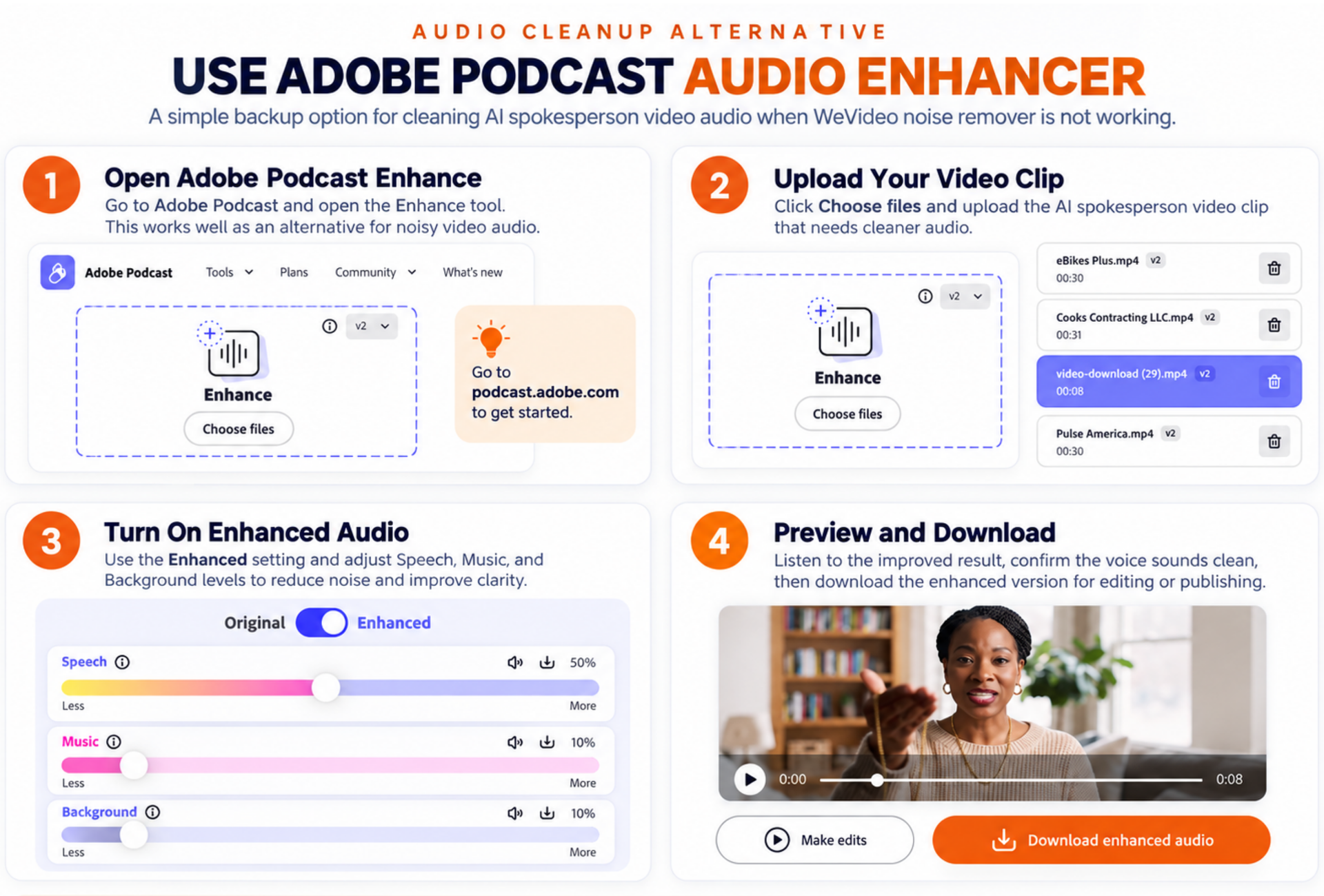
Remove Background Noise from AI Spokesperson Videos with Adobe Podcast
When WeVideo’s noise reduction feature is buggy, unavailable, or not producing the quality you need, Adobe Podcast Enhance provides a simple alternative for improving AI spokesperson videos and other recorded clips.
It Helps You:
- Reduce background noise and remove distracting audio elements.
- Improve speech clarity so voices sound cleaner and easier to understand.
- Create a more professional audio result with minimal setup.
How It Works:
- Upload your video clip to Adobe Podcast Enhance: https://podcast.adobe.com/en/enhance
- Wait for the audio processing to complete.
- Preview the enhanced result and compare the improvement.
- Download the cleaned-up version for use in your video editing workflow.
This tool works well as a backup solution when
WeVideo’s built-in noise remover is not working properly or when your AI spokesperson videos need extra voice enhancement before publishing.